SEZGUI
Menu

How it works

Sezgui is designed to connect what your fleet does to what your permits, contracts and insurers ask of you. It raises review questions and keeps the record. People decide.

In development. This page describes the product we're building with design partners.

  1. 1Connect
  2. 2Map
  3. 3Monitor
  4. 4Route
  5. 5Record

1 · Connect

Connect fleet data and documents.

Your fleet system sends events: zone, software version, speed setting, incident. Sezgui reads them. It never sends commands to robots.

You add the documents that set your obligations: permits, platform contracts and insurance policies.
2 · Map

Map each change or event to permits, laws, and contracts.

Each event is compared with the conditions that may apply where it happened. Each condition cites the source it comes from.

When something may not match, Sezgui opens a review question instead of reaching a conclusion.

Illustrative example
  1. Change

    A software update raises the robots' cruising speed.

  2. Evidence

    Fleet data shows the new top-speed setting on the updated robots.

  3. Commitment

    The city permit's speed condition, with its source and section.

Review question

Does the new setting let robots travel above the permit's speed limit, and is a change planned?

3 · Monitor

Monitor for drift and deadlines.

Fleet counts, zones, hours, speed and software versions change over time. Sezgui tracks them against your conditions.

It also tracks the deadlines in your permits, platform contracts and insurance policies: data reports, renewals, insurer notices.

4 · Route

Route to operations, compliance, or counsel.

Each question goes to a named role. Legal questions go to counsel, in counsel's own channel.

Sezgui doesn't decide whether something is legal or whether it must be reported.

5 · Record

Record every decision.

Who answered, what they knew and when go into an append-only record: corrections are added, never written over.

Each export carries its SHA-256 hash, so anyone who has the file can check whether it has changed since export.

The city permit library

We're building the library city by city. For each city it will track the conditions an operator works under, and keep each version.

  • Fleet caps
  • Zones
  • Hours
  • Speed
  • Insurance minimums
  • Data and incident reporting
  • Renewals
  • Fees

We're building each city's pack so that each condition cites the public source it comes from and carries a lawyer-review status. That review is how we build the software. It isn't legal advice to you, and your own counsel decides what your permit requires.

Incident mode

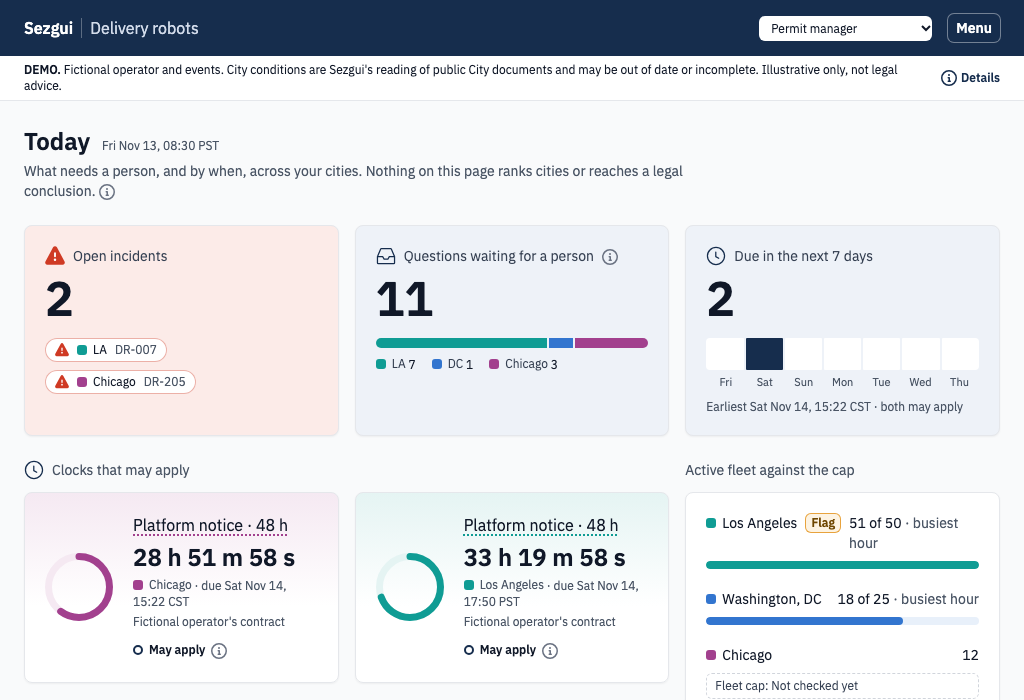
In an incident, Sezgui is designed to list the clocks that may apply and record where footage and logs are kept.

  • A clock board

    Each deadline that may apply, with the time left.

  • Facts telemetry can't show

    A checklist of what a person has to find out.

  • A legal-hold prompt for counsel

    Counsel decides whether to place a hold.

  • A timeline of decisions

    Who decided what, and when.

Each clock stays “may apply” until counsel rules it out. Sezgui lists them; people decide.

Incident at 2:14 pm · Robot hits a litter bin

Illustrative · synthetic data
  • Platform contract incident notice

    May apply

    3h 46m

  • City incident report

    May apply

    21h 46m

  • Insurer notice

    May apply

    4d 21h

  • Data report to the city

    Ruled out by counsel

    —

Facts telemetry can't show

  • Was anyone hurt?
  • Was property damaged?
  • Did anyone call 311 or the police?

For counsel

Place a legal hold on this incident's records?

Counsel decides.

Timeline

  1. 2:14 pmEvent received from the fleet system
  2. 2:21 pmOperations confirmed the robot is back at its depot
  3. 2:40 pmCounsel ruled out one clock
A static mockup. The event, deadlines and times are fictional.

Integrations we're building

None of these is live yet. We'll build them with design partners.

  • Fleet management systems
  • Mobility Data Specification feeds
  • Document storage
  • Slack
  • Legal intake

Interactive demo with fictional data

A clickable walk-through of one fictional delivery-robot operator's day.